The DORI Standard: Pixels Per Metre Explained
The DORI standard, EN 62676-4, defines four thresholds in pixels per metre of scene, measured horizontally: detect at 25 ppm, observe at 62.5 ppm, recognise at 125 ppm, and identify at 250 ppm. Identify needs ten times the pixel density of detect.
DORI stands for Detect, Observe, Recognise, Identify. It comes from EN 62676-4, the European standard for video surveillance system requirements, and it answers a question that a megapixel count alone cannot: at a given distance, does this camera actually resolve enough detail to be useful.
The measure is pixels per metre (ppm) of scene width, not pixels on the sensor. A camera can be 8MP and still fail to identify a face at 20 metres if the lens is too wide for that distance, because the same 3,840 horizontal pixels are spread across a much wider strip of scene.
| Level | Pixels per metre | What it proves | Typical use |
|---|---|---|---|
| Detect | 25 ppm | Something is there, and it is a person rather than an animal or a shadow. | Wide perimeter coverage, motion trigger |
| Observe | 62.5 ppm | Clothing and behaviour are visible. You can follow what someone is doing. | General activity monitoring |
| Recognise | 125 ppm | You can tell whether this is someone you already know. | Front door, driveway |
| Identify | 250 ppm | A stranger can be identified from the footage to an evidential standard. | Face at an entry point, licence plate |
| Focal length | Detect (25 ppm) | Observe (62.5 ppm) | Recognise (125 ppm) | Identify (250 ppm) |
|---|---|---|---|---|
| 2.8 mm | 84.0 m | 33.6 m | 16.8 m | 8.4 m |
| 4 mm | 120.0 m | 48.0 m | 24.0 m | 12.0 m |
| 6 mm | 180.0 m | 72.0 m | 36.0 m | 18.0 m |
| 8 mm | 240.0 m | 96.0 m | 48.0 m | 24.0 m |
| 12 mm | 360.0 m | 144.0 m | 72.0 m | 36.0 m |
| Resolution | Detect | Observe | Recognise | Identify |
|---|---|---|---|---|
| 2MP (1080p) | 60.0 m | 24.0 m | 12.0 m | 6.0 m |
| 4MP (1440p) | 80.0 m | 32.0 m | 16.0 m | 8.0 m |
| 5MP | 81.0 m | 32.4 m | 16.2 m | 8.1 m |
| 6MP | 96.0 m | 38.4 m | 19.2 m | 9.6 m |
| 8MP/4K | 120.0 m | 48.0 m | 24.0 m | 12.0 m |
| 12MP | 141.0 m | 56.4 m | 28.2 m | 14.1 m |
Why is DORI measured in pixels per metre, not resolution?
Resolution describes the sensor. DORI describes the scene. The same 4MP camera can meet the identify threshold at 8 metres with a narrow 12 mm lens, or fail to even detect a person past 15 metres with a wide 2.8 mm lens, because the lens decides how many metres of real-world width those pixels are spread across.
This is also why a wide-angle "sees everything" camera and a narrow "sees far" camera are not interchangeable. A single camera cannot maximise both field of view and DORI distance at the same time; widening the lens to cover more of a yard shortens the distance at which faces can still be identified.
How is DORI distance calculated?
The standard geometry is: DORI distance = horizontal pixels / (required ppm x 2 x tan(horizontal field of view / 2)). Horizontal field of view itself comes from the lens focal length and the sensor width: hfov = 2 x atan(sensor width / (2 x focal length)).
A longer focal length narrows the field of view, which concentrates the same pixel count into a narrower slice of scene and pushes the DORI distance further out. A wider sensor at the same focal length does the opposite, widening the angle and shortening the distance.
The gear that matches this answer

Amcrest UltraHD 4K 8MP Outdoor Bullet Security IP PoE Camera, 98ft NightVision
$94.95Amcrest publishes its IR range and its lens focal length in the listing, which is rarer than it should be and is what makes a coverage calculation possible before you buy.
- Resolution
- 8 MP
- Stated IR range
- 98 ft
- Lens
- 2.8 mm
Prices change often.
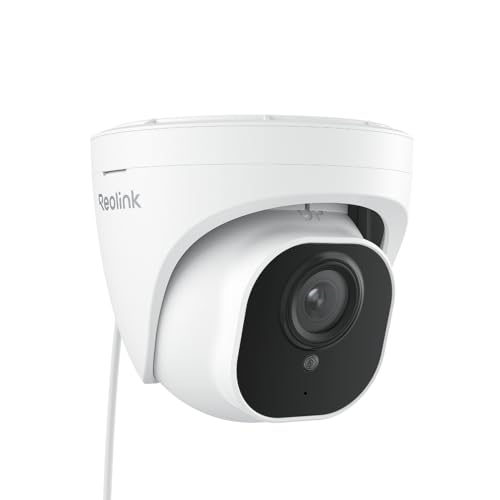
REOLINK RLC-820A 4K PoE Security Camera, Wired Outdoor Dome
$99.99The dome counterpart to the RLC-810A, same sensor and same detection, in a body that does not advertise which way it is looking.
- Resolution
- 8 MP
Prices change often.

REOLINK RLC-810A PoE Security Camera, 4K Wired Outdoor
$84.99The default 4K PoE bullet in this catalog: person and vehicle detection on the camera itself, so alerts are not triggered by every passing shadow.
- Resolution
- 8 MP
- Lens
- 4 mm
- Storage
- PoE, needs an NVR or NAS
Prices change often.

Amcrest 5MP Turret PoE Camera, UltraHD Outdoor IP Camera with Mic
$74.99Five megapixels and a built in microphone, and that microphone is the reason to read the audio recording section on this site before switching it on.
- Resolution
- 5 MP
Check first:This camera records audio. Audio is legally different from video and many US states require the consent of all parties. Check your own state before enabling it.
Check price on AmazonPrices change often.

Ring Wired Doorbell 4K Pro with Wide-Angle Video
$249.99Four times the pixels of the 1080p doorbell, which is the only doorbell here that reaches identification standard at the far edge of a porch.
Check price on AmazonPrices change often.
Common questions
What does the observe level in DORI actually let you see?
Observe requires 62.5 pixels per metre of scene width. At that density you can follow what a person is doing and make out clothing and general build, but you cannot confidently identify them or read fine detail like a licence plate. It sits between detect, which only confirms a person is present, and recognise, which lets you tell whether it is someone you already know.
Can one camera meet identify and still cover a wide area?
Not at the same time from the same lens setting. A wide field of view spreads a fixed pixel count across more metres of scene, which lowers pixels per metre and shortens the identify distance. Sites that need both wide coverage and identify-level detail at a gate typically use two cameras, a wide overview unit and a narrower, more telephoto unit aimed at the specific choke point.
Does DORI apply to night footage the same way?
The pixel geometry is identical day or night; ppm depends only on lens, sensor, resolution, and distance. What changes at night is whether the scene has enough light or infrared illumination for the sensor to actually resolve that pixel density into usable contrast. A camera can meet the identify ppm threshold on paper and still produce a washed-out or noisy frame if the IR range falls short of the same distance.
Why do two 4MP cameras give different DORI distances?
Because DORI distance depends on the lens, not just the sensor resolution. Two 4MP cameras with different focal lengths, say 2.8 mm and 6 mm, will produce very different identify distances (5.6 m versus 12.0 m on a 1/2.8 inch sensor) even though both report the same 2560x1440 pixel count. Always check the lens focal length alongside the megapixel figure before comparing two cameras' effective range.
Is EN 62676-4 a legal requirement for home cameras?
No. EN 62676-4 is a published European standard used across the security industry to describe camera performance consistently, and it is the basis this site uses for distance figures, but it is not a licensing or legal requirement for a residential installation. It is useful precisely because it gives a shared, checkable definition of what "identify a face at 20 metres" means, instead of a marketing claim with no fixed threshold behind it.
Get the system planning sheet
The camera count, storage and PoE budget worksheet, plus the wiring checklist, as one printable page.
Keep going
Before you point a camera at anything. Aim cameras at your own property and your own boundary, never into a neighbour's windows or across their garden. Cameras in bedrooms, bathrooms, or anywhere else a person reasonably expects privacy are a serious legal problem, and that includes guests, lodgers and anyone who works in your home. Audio is legally different from video, many US states require the consent of every party to a recorded conversation, and several recorders capture audio by default, so check your own state before you enable it. Some places require visible notice that recording is taking place, and landlords and homeowner associations often impose their own rules on top. This is researched general information and not legal advice, and the law varies by state and by country.
And once it is installed. Change every default password, keep the firmware updated, and be clear with yourself about where the footage goes: a cloud camera means a third party holds recordings of your home, while a local recorder keeps them in your house. That is a genuine buying consideration, not a technicality.