PoE Power Budget Calculator
Eight class 3 cameras require a switch that budgets 123.2 W, because IEEE 802.3af reserves 15.4 W per port even though each camera draws at most 12.95 W. Size a switch on the reserved figure, never on the camera draw.
Values update as you change the inputs. Where a figure cannot be computed honestly from what manufacturers publish, this calculator says so rather than showing a zero.
Switches that carry this budget
This grid re-orders itself against the number you just calculated, smallest adequate option first.
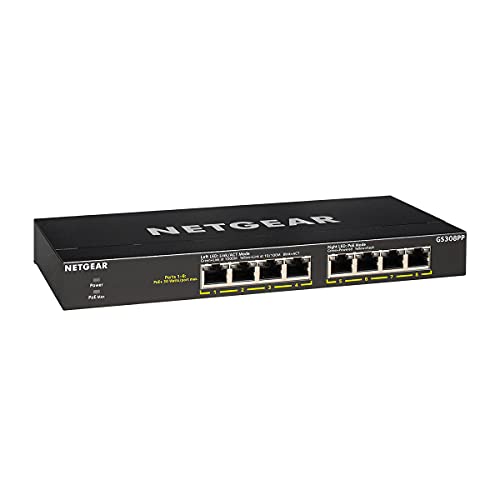
NETGEAR 8-Port PoE Gigabit Ethernet Unmanaged Network Switch GS308PP
$69.99An 83 W budget across eight PoE ports, which carries six to eight class 3 cameras with the headroom that stops a switch shutting a port down on a cold night when the heaters run.
- PoE ports
- 8
- PoE budget
- 83 W
- PoE standard
- 802.3af/at
Prices change often.

TP-Link 8 Port Gigabit PoE Switch, 8 PoE+ Ports at 126W
$89.99A 126 W budget is enough for eight class 3 cameras at their full standards allocation of 15.4 W each, with nothing left to chance.
- PoE ports
- 8
- PoE budget
- 126 W
- PoE standard
- 802.3af/at
Prices change often.

TP-Link LS108GP 8 Port PoE Gigabit Ethernet Switch
$57.49The cheapest switch here that still carries a realistic budget for four cameras, and the right choice when the camera count is genuinely four.
- PoE ports
- 8
- PoE standard
- 802.3af/at
Prices change often.

NETGEAR 8 Port PoE Gigabit Ethernet Easy Smart Managed Switch GS308EP
$79.99Managed, so the cameras can be put on their own VLAN and kept off the rest of the home network, which is the single most effective thing you can do about camera firmware you do not control.
- PoE ports
- 8
- PoE standard
- 802.3af/at
Prices change often.

NETGEAR 16-Port PoE Gigabit Ethernet Unmanaged Network Switch GS316P
$135.75Sixteen ports with a 115 W budget, which suits a mixed system where not every port is a camera.
- PoE ports
- 16
- PoE budget
- 115 W
- PoE standard
- 802.3af/at
Prices change often.

NETGEAR 16 Port PoE Gigabit Ethernet Unmanaged Network Switch GS316PP
$159.99The same sixteen ports with a 183 W budget, which is what a genuinely full sixteen camera system needs.
- PoE ports
- 16
- PoE budget
- 183 W
- PoE standard
- 802.3af/at
Prices change often.

TP-Link TL-SG116P 16 Port Gigabit PoE Switch
$126.38Sixteen PoE ports at a lower price than the equivalent NETGEAR, with a 120 W budget that suits class 2 and class 3 cameras.
- PoE ports
- 16
- PoE budget
- 120 W
- PoE standard
- 802.3af/at
Prices change often.

TP-Link TL-SG1218MP 16 Port Gigabit PoE Switch
$169.99A 192 W budget in a rack mount body, for a system where PTZ cameras and heaters push several ports into class 4.
- PoE ports
- 16
- PoE budget
- 192 W
- PoE standard
- 802.3af/at
Prices change often.

Linksys LGS116P 16 Port Gigabit Unmanaged PoE Switch with 8 PoE+ Ports at 80W
$83.64Sixteen gigabit ports of which eight carry power, which fits the common case of eight cameras plus a recorder, a router and a few wired devices.
- Total ports
- 16
- PoE ports
- 8
- PoE budget
- 80 W
- PoE standard
- 802.3af/at
Prices change often.
The formula
required budget = sum over classes of (cameras x PSE allocation), then add headroom
The gap between the reserved watts and the camera draw is the worst case cable loss the standard assumes. Sizing on camera draw is the most common way to overcommit a switch, and it fails on the coldest night when every heater runs.
Common questions
Why does a switch need to budget 123 watts for cameras that only draw 104 watts?
Eight class 3 cameras draw at most 103.6 W combined, 12.95 W each, but IEEE 802.3af requires the switch to reserve 15.4 W per port regardless, for a total budget of 123.2 W. The gap covers the worst case cable loss the standard assumes. Size a switch on that reserved 123.2 W figure, never on the lower camera draw number.
What is the difference between PoE class PSE and PD wattage?
PSE wattage is what the switch, the power sourcing equipment, must reserve per port under the IEEE standard. PD wattage is what the camera, the powered device, actually draws. For a class 3 camera those are 15.4 W reserved against 12.95 W drawn. Always size a switch total budget on the higher PSE figure, since that is what the standard enforces.
What happens if a PoE switch is over budget?
An over budget PoE switch does not get damaged. It sheds ports instead, refusing to power some cameras or dropping them once total demand exceeds what the switch can supply, often on the coldest night when heaters in outdoor cameras draw the most power. Adding headroom, commonly 20 percent above the calculated PSE total, avoids running a switch right at its ceiling.
What is the difference between 802.3af, 802.3at and 802.3bt?
802.3af, the original PoE standard, reserves up to 15.4 W per port. 802.3at, PoE+, reserves up to 30 W, enough for heaters and small pan tilt zoom cameras. 802.3bt, PoE++, reserves up to 90 W at its highest class, covering full size PTZ cameras with heaters. Each standard sets what the switch must budget, not what a camera will actually draw.
How much headroom should I add above the calculated PoE budget?
A common convention is about 20 percent above the summed PSE figure, so eight class 3 cameras at 123.2 W would target a switch rated near 148 W or higher. That headroom absorbs future cameras, firmware updates that raise draw, and the worst case scenario of every heater and IR illuminator running at once on a cold night.
Get the system planning sheet
The camera count, storage and PoE budget worksheet, plus the wiring checklist, as one printable page.
Keep going
A calculated figure is a planning number, not a promise. Every answer here comes from published standards and manufacturer specifications, and real installations vary with light, weather, scene motion and how a camera is actually aimed. Where a figure cannot be computed honestly from what manufacturers publish, this calculator says so rather than showing a zero.
Before you point a camera at anything. Aim at your own property and your own boundary, never into a neighbour's windows. Cameras in bedrooms, bathrooms or anywhere with a reasonable expectation of privacy are a serious legal problem, including for guests and anyone who works in your home. Audio is legally different from video, many US states require the consent of every party to a recorded conversation, and several recorders capture audio by default, so check your own state before enabling it. This is researched general information and not legal advice.