How Power over Ethernet Actually Works
802.3af reserves 15.4 W at the switch for a camera that can draw up to 12.95 W, 802.3at reserves 30 W for up to 25.5 W, and 802.3bt reserves up to 90 W for up to 71.3 W. The gap between the switch figure and the camera figure is the cable loss the standard already assumes, so a multi-camera budget has to be built on the switch number, not the camera's own draw spec.
Power over Ethernet sends electrical power and network data down the same twisted-pair cable, so a camera on the wall needs one Cat5e or Cat6 run and nothing else: no outlet, no separate transformer, no battery to charge. That single-cable simplicity is most of the reason PoE cameras dominate serious installs over wifi cameras that still need a nearby power source.
Every number in this guide comes from IEEE 802.3, the standard that defines PoE power classes, and none of it is a house convention that a reader is free to adjust. The classes below are fixed by the standard and are not ours to change.
Understanding the gap between what a switch reserves and what a camera actually draws is the single most useful thing to take from this page, since it is the difference between a switch budget that genuinely works and one that quietly overcommits the moment a few more cameras join the network.
| Class | Standard | Switch budget (PSE) | Camera draw (PD) | Typical use |
|---|---|---|---|---|
| 0 | 802.3af | 15.4 W | 12.95 W | Unclassified; the switch must assume a full 15.4 W |
| 1 | 802.3af | 4.0 W | 3.84 W | Very low power devices |
| 2 | 802.3af | 7.0 W | 6.49 W | Small fixed cameras |
| 3 | 802.3af | 15.4 W | 12.95 W | Most fixed PoE cameras, including IR bullets and domes |
| 4 | 802.3at | 30.0 W | 25.5 W | PoE+: heaters, wipers, small PTZ |
| 5 | 802.3bt | 45.0 W | 40.0 W | PoE++ Type 3 |
| 6 | 802.3bt | 60.0 W | 51.0 W | PoE++ Type 3, full size PTZ with heater |
| 7 | 802.3bt | 75.0 W | 62.0 W | PoE++ Type 4 |
| 8 | 802.3bt | 90.0 W | 71.3 W | PoE++ Type 4, the ceiling of the standard |
| Item | Value |
|---|---|
| Cameras | 8 |
| Class | 3 (802.3af, most fixed cameras) |
| Per-camera switch budget | 15.4 W |
| Total switch budget needed | 123.2 W |
| With a 20 percent headroom convention | About 147.8 W |
What is PoE actually doing on that one cable?
A PoE switch (or a standalone injector) puts a low-voltage DC current onto the same copper pairs already carrying the camera's network traffic. The camera has a receiver that detects a valid PoE device on the other end, negotiates a power class, and only then draws current, so plugging an ordinary non-PoE device into a PoE port does not damage it.
That negotiation step is why a PoE port and a PoE camera are described in class numbers rather than a single wattage figure: the switch and the camera agree on a class before real power flows, and the class sets both sides of the budget at once.
This is also why a single Cat5e or Cat6 run genuinely replaces both a network cable and a power cable for the camera at the far end. There is no separate low-voltage transformer plugged in near the camera, and nothing at the camera end to fail independently of the cable itself.
What is the difference between what the switch reserves and what the camera draws?
IEEE 802.3 labels the switch side the PSE, for power sourcing equipment, and the camera side the PD, for powered device. The PSE figure is always higher than the PD figure for the same class, and that gap is not padding, it is the cable loss the standard assumes will happen between the switch and the far end of a real-world run.
A class 3 camera under 802.3af is rated to draw up to 12.95 W, but the switch has to reserve 15.4 W for that port. A class 4 camera under 802.3at draws up to 25.5 W against a 30 W switch reservation. At the top of the standard, 802.3bt class 8 reserves up to 90 W at the switch for a device drawing up to 71.3 W. Any budget built by summing cameras has to use the PSE column, because that is what the switch actually commits per port.
Class 0, sometimes called unclassified, is a special case: a device that does not report a specific class still gets treated as though it could need the full 15.4 W, so the switch reserves that amount regardless of what the device actually ends up drawing. Treating an unclassified device as anything less would risk starving it mid-operation.
Which class does a given camera actually need?
Most fixed dome and bullet cameras, including ones with built-in IR illuminators, sit in class 3 under 802.3af and need 15.4 W of switch budget each. Cameras with a heater, a wiper, or a small pan-tilt-zoom mechanism typically move up to class 4 under 802.3at at 30 W. Full-size PTZ domes with a heater, or anything drawing serious continuous current, climb into the 802.3bt classes at 45 W and above.
The class a specific camera needs is published in its own spec sheet, never assumed; a switch sized for class 3 across the board will not power a class 4 or higher camera reliably even if the port itself is capable of more.
A camera that adds a heater specifically for cold climates is one of the more common reasons a fixed camera jumps from class 3 to class 4 despite otherwise looking like an ordinary bullet or dome; the heater draws real current during cold weather even though the camera behaves like any other class 3 device the rest of the year.
How do I size a switch for several cameras at once?
The arithmetic is a straight sum of PSE figures across every camera on the switch. Eight class 3 cameras each need 15.4 W of switch budget, for a total of 123.2 W that the switch has to be able to deliver simultaneously across all eight ports, not just per port.
A common practice is to add roughly 20 percent headroom on top of that total rather than buying a switch that sits exactly at its rated ceiling, which leaves room for a firmware update, a colder night that draws a heater harder, or a future camera added to a spare port. The PoE power budget calculator runs this exact sum for a specific mix of camera classes.
Mixing classes on one switch is normal and just means summing each camera's own class figure rather than assuming every port draws the same amount; six class 3 cameras and two class 4 cameras add up to 6 times 15.4 W plus 2 times 30 W, for a total of 152.4 W before any headroom is added.
What actually happens if the switch budget is too small?
PoE negotiation is designed to refuse power a port cannot honestly deliver rather than deliver an unsafe partial voltage, so an undersized switch typically shows up as a port that will not power on a newly added camera, or as a camera that browns out and reboots once several other ports are drawing near their combined ceiling at the same time.
This is a budgeting problem to fix at the switch, not a fault to chase in the camera. Reviewing the total PSE figure for every camera on that switch, including anything added after the original install, is the first check.
A switch that reports its total PoE draw somewhere in its management interface makes this easier to catch early: a total sitting close to the switch's rated ceiling on an ordinary day is a sign that a single cold night, a firmware update, or one more camera could tip it over.
Does cable length eat into the power budget?
Yes, indirectly. The PSE-to-PD gap in every class already assumes a realistic cable loss for a run within the ANSI/TIA-568 100 metre channel limit, using solid bare copper. A longer run, a run near that limit, or a run built on copper-clad aluminium instead of solid copper loses more voltage than the standard assumes, which is exactly the scenario that produces an intermittent camera rather than one that is cleanly on or off.
The cable run limit calculator checks a specific run length against the 100 metre channel, and the running cable guide covers why the conductor material itself matters for a powered run.
A run that sits comfortably within the 100 metre channel on solid copper leaves the PSE-to-PD gap in each class as the only cable loss the camera actually has to absorb, which is the scenario the standard was designed around and the one worth aiming for on every run.
When does a PoE extender or midspan injector make sense?
A PoE extender or repeater sits partway along a run and re-issues both the data signal and a fresh power injection, which is the standard way to reach a camera further than a single 100 metre channel from the switch would otherwise allow. Each hop still has to respect the 100 metre limit on its own segment; an extender resets the channel, it does not stretch it indefinitely.
A standalone PoE injector is the simpler option for a single camera that is not near an existing PoE switch: it takes an ordinary network connection in, adds power, and sends both out on one cable to the camera, at whatever class the injector itself is rated for.
An injector or extender still needs its own power source at the point it sits, whether that is a nearby outlet or a small enclosure fed from the house circuit, so its placement has to account for that just as much as it accounts for the cable run on either side of it.
The gear that matches this answer
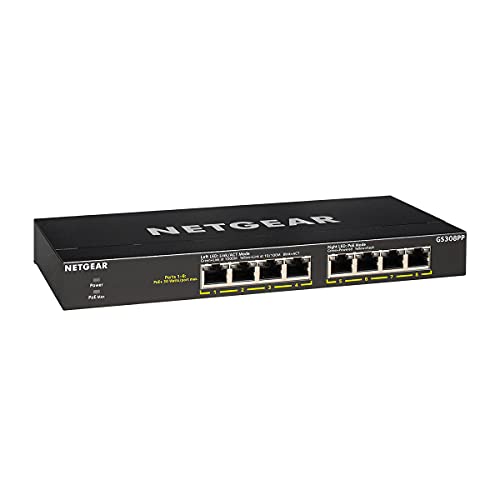
NETGEAR 8-Port PoE Gigabit Ethernet Unmanaged Network Switch GS308PP
$69.99An 83 W budget across eight PoE ports, which carries six to eight class 3 cameras with the headroom that stops a switch shutting a port down on a cold night when the heaters run.
- PoE ports
- 8
- PoE budget
- 83 W
- PoE standard
- 802.3af/at
Prices change often.

TP-Link 8 Port Gigabit PoE Switch, 8 PoE+ Ports at 126W
$89.99A 126 W budget is enough for eight class 3 cameras at their full standards allocation of 15.4 W each, with nothing left to chance.
- PoE ports
- 8
- PoE budget
- 126 W
- PoE standard
- 802.3af/at
Prices change often.

TP-Link Omada PoE+ Injector, Up to 30W, Gigabit, POE160S
$19.99Thirty watts is the full 802.3at allocation, so this injector will run anything up to and including a small PTZ camera.
- PoE standard
- 802.3at
- PoE budget
- 30 W
Prices change often.

REOLINK RLC-810A PoE Security Camera, 4K Wired Outdoor
$84.99The default 4K PoE bullet in this catalog: person and vehicle detection on the camera itself, so alerts are not triggered by every passing shadow.
- Resolution
- 8 MP
- Lens
- 4 mm
- Storage
- PoE, needs an NVR or NAS
Prices change often.

Amcrest UltraHD 4K 8MP IP PoE AI Camera, 129 degree FOV, 49ft Color Nightvision
$109.99A 129 degree field of view covers a whole driveway from one mount, at the cost of pixel density: the wider the lens, the shorter the distance at which it can still identify anyone.
- Resolution
- 8 MP
- Field of view
- 129 degrees
- Stated IR range
- 49 ft
Prices change often.

NETGEAR 16 Port PoE Gigabit Ethernet Unmanaged Network Switch GS316PP
$159.99The same sixteen ports with a 183 W budget, which is what a genuinely full sixteen camera system needs.
- PoE ports
- 16
- PoE budget
- 183 W
- PoE standard
- 802.3af/at
Prices change often.
Common questions
What is the practical difference between 802.3af and 802.3at?
802.3af, sometimes called PoE, reserves up to 15.4 W per port at the switch for a camera drawing up to 12.95 W, enough for most fixed dome and bullet cameras. 802.3at, called PoE+, reserves up to 30 W for a device drawing up to 25.5 W, needed for cameras with a heater, a wiper, or a small pan-tilt-zoom mechanism that draws more current than a simple fixed camera.
Should I budget a PoE switch using the camera's own power spec or the switch class figure?
Always the switch-side figure, called the PSE rating in the standard. The camera's own draw spec (the PD figure) is always lower, because the standard bakes in an assumed cable loss between the switch and the camera. Summing camera draw figures instead of switch figures will undercount the real load and can leave a switch unable to power every camera at once.
What happens if I plug a non-PoE device into a PoE switch port?
Nothing damaging. PoE ports run a negotiation step before sending any real power, checking for a valid PoE device signature on the other end. A device without that signature, such as an ordinary computer or an unmanaged switch, is treated as non-PoE and receives no power, only the normal network signal.
Why add 20 percent headroom to a PoE switch budget?
The 20 percent figure is a common practice, not a requirement in the standard itself. It leaves room for a camera added later, a firmware update that briefly increases draw, or conditions like cold weather that make a heater-equipped camera pull closer to its rated ceiling more often. A switch sized exactly to the current total leaves no margin for any of that.
Can PoE run further than a single 100 metre cable channel?
Not on a single unbroken channel; the 100 metre ANSI/TIA-568 limit applies to that segment. A PoE extender placed partway along the route re-injects both data and power and effectively starts a fresh 100 metre channel from that point, which is the standard way to reach a camera further from the switch than one channel alone would allow.
Get the system planning sheet
The camera count, storage and PoE budget worksheet, plus the wiring checklist, as one printable page.
Keep going
Before you point a camera at anything. Aim cameras at your own property and your own boundary, never into a neighbour's windows or across their garden. Cameras in bedrooms, bathrooms, or anywhere else a person reasonably expects privacy are a serious legal problem, and that includes guests, lodgers and anyone who works in your home. Audio is legally different from video, many US states require the consent of every party to a recorded conversation, and several recorders capture audio by default, so check your own state before you enable it. Some places require visible notice that recording is taking place, and landlords and homeowner associations often impose their own rules on top. This is researched general information and not legal advice, and the law varies by state and by country.
And once it is installed. Change every default password, keep the firmware updated, and be clear with yourself about where the footage goes: a cloud camera means a third party holds recordings of your home, while a local recorder keeps them in your house. That is a genuine buying consideration, not a technicality.
When summing several cameras onto one switch, add the switch-side (PSE) figure for every camera, never the camera's own draw spec; that is the number the switch actually has to deliver.