Running Cable for Security Cameras
A PoE camera run needs solid bare copper Cat5e or Cat6 rated for its environment, terminated into punch-down keystone jacks, kept under the ANSI/TIA-568 channel limit of 100 metres (about 328 feet) including patch leads at both ends. Copper-clad aluminium falls outside that standard, causes voltage drop severe enough to affect a powered camera, and should not be used for a PoE run.
The cable is the most permanent decision in a camera install. A camera, a switch, or an NVR can be swapped out in an afternoon; cable pulled through a finished wall or run through conduit under a driveway is generally staying put for the life of the house. Getting the conductor material and the run length right the first time avoids redoing that work.
Two figures anchor everything in this guide: the ANSI/TIA-568 100 metre channel limit, which is fixed by the standard, and the choice between solid copper and copper-clad aluminium, which is also effectively fixed once a powered PoE run is involved.
None of this is exotic wiring work. It is the same structured cabling practice used in offices for decades, applied to a residential camera install where the stakes of a badly terminated run are a camera that drops out at three in the morning rather than a slow office network.
| Segment | Length |
|---|---|
| Horizontal solid cable | Up to 90 m (about 295 ft) |
| Patch leads at both ends, combined | Up to 10 m (about 33 ft) |
| Total channel | 100 m (about 328 ft) |
| Conductor type | Where it belongs | Why |
|---|---|---|
| Solid core | The permanent horizontal run, terminated at keystone jacks | Lower resistance over distance and a jack contact designed to bite into a single solid strand |
| Stranded (patch cable) | Short flexible leads at the switch and at the camera or wall plate | Flexes repeatedly without breaking, but is not meant for a long permanent power-carrying run |
What actually makes a cable rated for outdoor or direct burial use?
Outdoor-rated cable typically adds a UV-resistant jacket so sunlight does not embrittle it over years on an exterior wall, and either a gel-filled core or a foam dielectric to keep water that gets into the jacket from wicking along the cable and reaching an indoor termination. A cable rated CMR is fine for a vertical riser between floors; direct burial cable adds a jacket built to survive constant soil contact.
Indoor-only cable used outdoors will usually still pass a network signal for a while, which is exactly what makes it a bad long-term choice: the failure shows up months later as water ingress or UV cracking rather than immediately at install.
A short exterior stretch, such as the last metre or two dropping down an exterior wall to a camera, is often where outdoor-rated cable gets skipped because the run seems too short to matter; that short stretch is exactly the section exposed to sun and rain year round, so it is not the place to save money on cable rating.
Why solid bare copper, not copper-clad aluminium?
Copper-clad aluminium (CCA) is a thin copper coating over an aluminium core, and it carries roughly 60 percent of solid copper's conductivity for the same gauge. On a data-only run that mostly means a slightly weaker signal; on a PoE run, where the cable is also carrying real current to power a camera, that extra resistance causes a voltage drop that can be severe enough to starve the camera at the far end, especially on a longer run.
CCA also sits outside the wiring standards that PoE and structured cabling are built around, so a run built on it is not something either the 100 metre channel limit or a PoE class budget was designed to account for. Solid bare copper is the only choice for a permanent PoE camera run.
Cable sold at a noticeably lower price per foot than comparable listings is worth checking closely for CCA in the specifications, since it is not always advertised prominently on the packaging and the two conductor types can look identical once stripped and terminated.
How long can a cable run actually be?
ANSI/TIA-568 sets the whole channel at 100 metres, about 328 feet, and that figure is not just the horizontal cable in the wall. It is 90 metres of solid horizontal cable plus up to 10 metres of stranded patch leads at both ends combined, all counted together against the same 100 metre ceiling.
A 95 metre horizontal pull has already used almost the entire patch allowance before a single patch cable is plugged in at either end, which is exactly the kind of run the cable run limit calculator is built to check before the cable goes into the wall.
A run that measures close to 90 metres of horizontal cable alone, before any patch leads are even considered, is worth re-routing or relocating the switch closer if at all possible, since it leaves almost no margin for the patch leads the channel still needs at both ends.
What happens if a run goes over the limit?
Going over 100 metres rarely fails cleanly. A run at 110 or 120 metres often works when it is first installed, then drops intermittently once the connection is under real-world conditions, or the link negotiates down to 100 Mbps instead of gigabit rather than refusing to connect at all.
That behavior is the reason intermittent dropouts on a single camera channel are usually an over-length or badly terminated cable run, not a faulty camera. Checking the actual run length and the termination quality is the first troubleshooting step, well before swapping the camera itself.
A camera that drops out only during specific weather, such as heavy rain or a hot afternoon, points toward a marginal termination or a length right at the edge of spec reacting to temperature or moisture rather than toward a camera hardware fault, since the camera itself has no obvious reason to behave differently by weather alone.
Solid core versus stranded, and where each belongs
Solid core conductor belongs in the permanent horizontal run between the switch location and the camera, terminated into punch-down keystone jacks that are built to bite into a single solid strand and hold it under spring tension. Stranded patch cable belongs only in the short flexible leads at each end: from the switch to the patch panel or wall plate, and from a wall plate to the camera itself.
Mixing the two at the wrong kind of connector, such as crimping a solid-core cable straight onto an RJ45 plug meant for stranded cable, produces a connection that can look fine on a first test and then develop intermittent contact as the cable flexes or the joint corrodes.
A connector rated specifically for solid conductor exists for this reason and looks similar to a standard RJ45 plug, so checking the packaging rather than assuming any RJ45 plug works with any cable type avoids building this problem into a termination from day one.
What tools make for a clean, verifiable run?
A cable tester that checks both continuity and measured length is what actually confirms a run is within spec rather than guessing from a tape measure along a route with bends and vertical drops. A punch-down tool seats solid core cleanly into a keystone jack, and a proper crimp tool handles the RJ45 ends on the short stranded patch leads.
A patch panel at the switch end keeps every terminated run labeled and organized, which matters far more once there are six or eight camera runs landing in the same closet than it does for a single camera.
A tone probe helps trace an unlabeled cable back to its origin in an existing run that was not documented at install time, which comes up more often than expected when adding a camera to a house with cabling already in the walls from a previous owner or a different project.
Running cable through attics, walls, and near mains wiring
Low-voltage cable can generally be run alongside household wiring with reasonable separation to avoid interference, but any point where the work actually touches the household electrical circuit itself, rather than just running low-voltage cable near it, is licensed electrician work in many places. That distinction matters most where a camera install also involves a floodlight or spotlight fixture wired into house power.
Fire-rated cable is required in some plenum spaces such as ducted attics; checking local code before a large cable run through those spaces is worth the few minutes it takes.
None of the low-voltage cable work described here requires an electrician on its own. The line to watch for is any point where the install adds a fixture that draws directly from household mains power, such as a floodlight tied into an existing circuit, which is a separate and licensed piece of work in many places.
The gear that matches this answer

TRUE CABLE Cat6 Direct Burial Bulk Ethernet Cable, Unshielded, 1000ft, 23AWG Solid Bare Copper
$277.99Direct burial rated with a solid bare copper conductor at 23AWG, which is the thickest common gauge and therefore the least voltage drop over a long PoE run.
- Cable category
- Cat6
- Conductor gauge
- 23 AWG
- Conductor
- Solid bare copper
- Length
- 1000 ft
Prices change often.
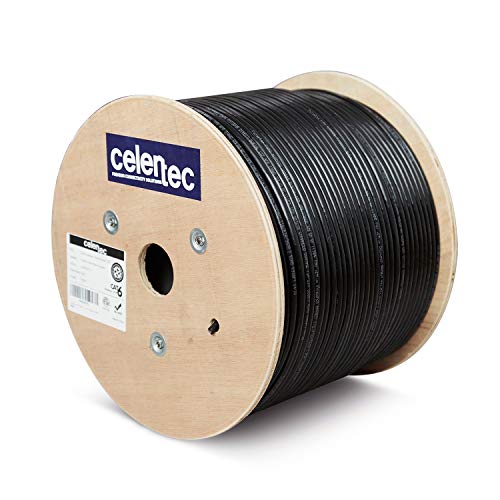
celertec CAT6 Outdoor Cable, 1000ft, 23AWG Solid Bare Copper, Unshielded
$219.99Solid bare copper at 23AWG for noticeably less than the TRUE CABLE equivalent, for outdoor runs that are not being buried.
- Cable category
- Cat6
- Conductor gauge
- 23 AWG
- Conductor
- Solid bare copper
- Length
- 1000 ft
Prices change often.

Klein Tools VDV526-100 Network LAN Cable Tester with Remote
$21.00The cheapest tester worth owning, and it catches the split pair and reversed pair faults that make a camera connect at 100 Mbps and then drop under load.
Check price on AmazonPrices change often.

ZoeRax Ethernet Crimping Tool Kit with RJ45 Pass Through Connectors
$29.99Pass through connectors let the conductors out of the front of the plug so the wire order can be checked before crimping, which removes the most common termination mistake.
Check price on AmazonPrices change often.

VCE UL Listed Cat6 Keystone Jacks 10Gbps, 25 Pack
$25.99Solid core cable is meant to terminate into a punch down jack, not into a crimped plug, and a 25 pack covers a whole house with spares.
Check price on AmazonPrices change often.

TRENDnet 24-Port Blank Keystone 1U Patch Panel, TC-KP24
$21.99Every camera run lands in one labelled place, which is the difference between a five minute fault find and an afternoon in the roof.
Check price on AmazonPrices change often.
Common questions
Why is copper-clad aluminium cable cheaper, and why avoid it anyway?
CCA cable is cheaper because it replaces most of the copper with aluminium, which costs less by weight. For a PoE camera run that tradeoff backfires: CCA carries roughly 60 percent of solid copper's conductivity, which causes a voltage drop on a powered run that solid copper does not have, and it sits outside the wiring standards PoE and structured cabling are built around.
Can I use Cat5e for a PoE camera instead of Cat6?
Yes for lower PoE classes and shorter runs; Cat5e supports 802.3af and 802.3at PoE within the standard 100 metre channel. Cat6 has more headroom for higher PoE++ classes, longer runs closer to the 100 metre limit, and future gigabit data needs, so it is the safer default for a run that is expensive to redo later.
Do I need shielded cable for a security camera run?
Only where the run passes near a real source of electrical interference, such as close and parallel to heavy mains wiring, fluorescent ballasts, or industrial equipment. A typical residential run alongside normal household wiring with reasonable separation does not usually need shielded cable, and unshielded cable is simpler to terminate.
Can I bury cable directly in the ground without conduit?
Only cable specifically rated for direct burial, which adds a jacket built to survive constant soil contact and moisture. Ordinary indoor or even standard outdoor-rated cable is not built for that and will degrade underground. Running any buried cable through conduit adds protection and makes a future replacement possible without digging up the yard again.
How do I tell if a dropout is the cable or the camera?
Check whether the same symptom follows the camera if it is swapped onto a different port and cable. If the problem stays on that channel regardless of which camera is plugged in, the cable or its termination is the likely cause, especially with an over-length run; if the problem follows the camera to a known-good cable, the camera itself is more likely at fault.
Get the system planning sheet
The camera count, storage and PoE budget worksheet, plus the wiring checklist, as one printable page.
Keep going
Before you point a camera at anything. Aim cameras at your own property and your own boundary, never into a neighbour's windows or across their garden. Cameras in bedrooms, bathrooms, or anywhere else a person reasonably expects privacy are a serious legal problem, and that includes guests, lodgers and anyone who works in your home. Audio is legally different from video, many US states require the consent of every party to a recorded conversation, and several recorders capture audio by default, so check your own state before you enable it. Some places require visible notice that recording is taking place, and landlords and homeowner associations often impose their own rules on top. This is researched general information and not legal advice, and the law varies by state and by country.
And once it is installed. Change every default password, keep the firmware updated, and be clear with yourself about where the footage goes: a cloud camera means a third party holds recordings of your home, while a local recorder keeps them in your house. That is a genuine buying consideration, not a technicality.
Test every run with a cable tester for both continuity and measured length before sealing any outdoor termination; it is far easier to fix before the weatherproofing goes on.