Ethernet Cable Length Limits for PoE Cameras
ANSI/TIA-568 caps a complete Ethernet channel at 100 metres (about 328 feet): up to 90 metres of solid horizontal cable plus up to 10 metres of stranded patch leads at both ends combined. A 95 metre horizontal run already exceeds spec once the patch allowance is added, even though 95 metres alone looks fine.
The 100 metre figure everyone quotes for Ethernet is not the length of one cable, it is the length of the whole channel: the fixed horizontal cable in the wall or conduit, plus the shorter flexible patch cords that connect it to the switch on one end and the camera or a wall jack on the other.
PoE cameras make this limit matter more than it does for a laptop, because voltage drop over a long run reduces how much power actually reaches the camera, on top of the data signal degrading. A run right at the edge of spec is a bad place to also be running a class 3 or class 4 camera near its power ceiling.
| Segment | Metres | Feet |
|---|---|---|
| Solid horizontal cable (max) | 90 m | 295.3 ft |
| Patch leads, both ends combined (max) | 10 m | 32.8 ft |
| Total channel (max) | 100 m | 328.1 ft |
| Horizontal run | In feet | Patch leads | Total channel | Within 100 m spec? | Margin |
|---|---|---|---|---|---|
| 50 m | 164.0 ft | 10 m | 60 m | Yes | 40 m |
| 80 m | 262.5 ft | 10 m | 90 m | Yes | 10 m |
| 90 m | 295.3 ft | 10 m | 100 m | Yes | 0 m |
| 95 m | 311.7 ft | 10 m | 105 m | No | -5 m |
| 98 m | 321.5 ft | 10 m | 108 m | No | -8 m |
| 100 m | 328.1 ft | 10 m | 110 m | No | -10 m |
| Patch leads, both ends combined | Maximum horizontal run | Total channel |
|---|---|---|
| 4 m | 96 m | 100 m |
| 6 m | 94 m | 100 m |
| 10 m | 90 m | 100 m |
| 14 m | 86 m | 100 m |
What counts toward the 100 metre limit?
The whole channel counts: the fixed cable run inside walls or conduit (the horizontal cable) plus every patch cord between equipment, added together across both ends of the link. A 92 metre horizontal run with a single 2 metre patch cord at the switch and a 2 metre patch cord at the camera totals 96 metres and is still within spec, but the same run with 5 metre patch cords on each end totals 102 metres and is over.
This is why a run that measures fine on the reel can still fail in practice: the extra patch cords used for a tidy cabinet or a flexible camera mount are part of the same 100 metre budget, not free additions on top of it.
What happens to PoE cameras beyond 100 metres?
Beyond the standard channel length, both signal integrity and voltage delivered to the camera degrade, in ways the 802.3 PoE classes were not designed to guarantee. Cameras that need longer distances typically use a PoE extender partway along the run, a media converter to fibre for the long haul with copper only at each end, or a switch placed physically closer to the cameras rather than trying to stretch one copper run past the limit.
The gear that matches this answer

TRUE CABLE Cat6 Direct Burial Bulk Ethernet Cable, Unshielded, 1000ft, 23AWG Solid Bare Copper
$277.99Direct burial rated with a solid bare copper conductor at 23AWG, which is the thickest common gauge and therefore the least voltage drop over a long PoE run.
- Cable category
- Cat6
- Conductor gauge
- 23 AWG
- Conductor
- Solid bare copper
- Length
- 1000 ft
Prices change often.

TRUE CABLE Cat6 Direct Burial Bulk Ethernet Cable, Shielded F/UTP, 1000ft, 23AWG
$300.99Shielded, which is worth the extra cost and the extra grounding work only when the run parallels mains wiring or a long fence line.
- Cable category
- Cat6
- Conductor gauge
- 23 AWG
- Conductor
- Solid bare copper
- Length
- 1000 ft
Check first:Shielded cable must be properly grounded at one end or the shield can make interference worse rather than better.
Check price on AmazonPrices change often.
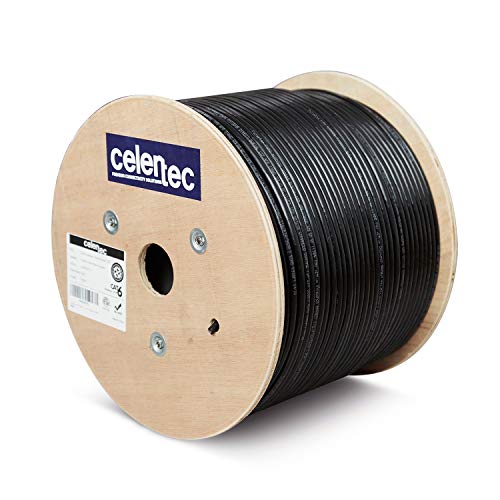
celertec CAT6 Outdoor Cable, 1000ft, 23AWG Solid Bare Copper, Unshielded
$219.99Solid bare copper at 23AWG for noticeably less than the TRUE CABLE equivalent, for outdoor runs that are not being buried.
- Cable category
- Cat6
- Conductor gauge
- 23 AWG
- Conductor
- Solid bare copper
- Length
- 1000 ft
Prices change often.

Klein Tools VDV526-100 Network LAN Cable Tester with Remote
$21.00The cheapest tester worth owning, and it catches the split pair and reversed pair faults that make a camera connect at 100 Mbps and then drop under load.
Check price on AmazonPrices change often.
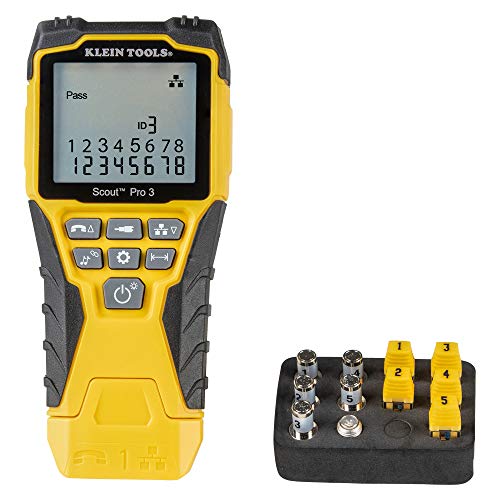
Klein Tools VDV501-851 Scout Pro 3 Tester Starter Set
$96.61Tests and identifies multiple runs at once with numbered remotes, which is what turns a sixteen camera install from a day of guessing into an afternoon.
Check price on AmazonPrices change often.
Common questions
Does Cat6 or Cat6a change the 100 metre limit?
No, the 100 metre channel length in ANSI/TIA-568 applies across Cat5e, Cat6, and Cat6a for standard Ethernet and PoE use. Higher cable categories improve signal quality, reduce crosstalk, and support faster data rates (10 Gigabit at shorter distances for Cat6a) at the same length, but none of them extend the 100 metre channel limit itself.
Can I run two cable segments end to end to reach further than 100 metres?
Not by simply joining two cables. Two runs joined with a coupler add signal loss at the joint and are still measured as one channel against the same 100 metre limit. To exceed 100 metres, an active device is required partway along, such as a PoE extender or a network switch, which regenerates the signal and effectively starts a new 100 metre channel from that point.
How do I know if a specific run is within spec before installing?
Measure the actual horizontal cable path, including vertical runs through walls and any slack, not the straight-line distance between endpoints, then add the length of every patch cord that will be used at both ends. A cable certification tester gives an exact result after installation, but a tape measure and a realistic patch cord estimate beforehand is usually enough to catch a run that is clearly over budget.
Does outdoor direct burial cable follow the same 100 metre limit?
Yes, the ANSI/TIA-568 channel length applies regardless of whether the cable runs indoors, in conduit, or is rated for direct burial outdoors. Outdoor-rated cable changes the jacket and shielding to survive UV, moisture, and temperature swings, but it does not change the underlying copper signal physics that set the 100 metre limit.
Is 100 metres the limit for the data signal, the PoE power, or both?
Both. The 100 metre channel length is defined for data signal integrity, and the IEEE 802.3 PoE standards assume that same maximum length when calculating the worst-case voltage drop baked into each power class's PSE-to-PD gap. A run within the 100 metre data limit is also within the distance the PoE power budget was designed around; there is no separate, shorter power-only limit to track.
Get the system planning sheet
The camera count, storage and PoE budget worksheet, plus the wiring checklist, as one printable page.
Keep going
Before you point a camera at anything. Aim cameras at your own property and your own boundary, never into a neighbour's windows or across their garden. Cameras in bedrooms, bathrooms, or anywhere else a person reasonably expects privacy are a serious legal problem, and that includes guests, lodgers and anyone who works in your home. Audio is legally different from video, many US states require the consent of every party to a recorded conversation, and several recorders capture audio by default, so check your own state before you enable it. Some places require visible notice that recording is taking place, and landlords and homeowner associations often impose their own rules on top. This is researched general information and not legal advice, and the law varies by state and by country.
And once it is installed. Change every default password, keep the firmware updated, and be clear with yourself about where the footage goes: a cloud camera means a third party holds recordings of your home, while a local recorder keeps them in your house. That is a genuine buying consideration, not a technicality.