NVR Channel Capacity and Camera Count Chart
Eight cameras need at least an 8-channel recorder, but the buy-one-size-up convention recommends a 16-channel NVR instead, leaving 8 spare channels, while those 8 cameras still need about 8.36 TB for 30 days of continuous 4MP H.265 recording and a 147.8 W switch budget.
NVRs are sold in standard channel tiers, most commonly 4, 8, 16 and 32 channels, and the common installer convention is to buy one tier above your current camera count so there is room to add cameras later without replacing the recorder. The table below applies that convention to a range of camera counts, alongside the storage and PoE numbers this site computes for continuous 4MP H.265 recording at 30 days of retention, a conventional target rather than a legal requirement.
| Cameras today | Minimum channels needed | Recommended NVR size | Spare channels | 30-day storage needed | PoE switch budget needed |
|---|---|---|---|---|---|
| 3 | 3 | 8-channel | 5 | 3.14 TB | 55.4 W |
| 4 | 4 | 8-channel | 4 | 4.18 TB | 73.9 W |
| 6 | 6 | 16-channel | 10 | 6.27 TB | 110.9 W |
| 8 | 8 | 16-channel | 8 | 8.36 TB | 147.8 W |
| 12 | 12 | 32-channel | 20 | 12.54 TB | 221.8 W |
| 16 | 16 | 32-channel | 16 | 16.72 TB | 295.7 W |
| 24 | 24 | 32-channel (ceiling of the standard tier) | 8 | 25.08 TB | 443.5 W |
| Model | Channels | Price |
|---|---|---|
| TRENDnet TV-NVR1508 | 8 | $107.99 |
| ANNKE 12MP 8-channel PoE NVR | 8 | $159.99 |
| REOLINK RLN8-410 | 8 | $349.99 |
| Lorex V-Series 8-channel NVR with 1TB | 8 | $399.99 |
| REOLINK RLN16-410 | 16 | $459.99 |
Why buy one channel size above your current camera count?
A recorder filled to its last channel on day one leaves no room to add a camera over a garage or a new gate without buying a second recorder or replacing the first. Sizing one tier up costs relatively little extra against a full system's price, and it is the single easiest way to avoid a forced hardware swap later.
What assumptions sit behind the storage and PoE columns?
Storage assumes every camera records continuously in 4MP H.265 at this site's conventional bitrate, kept for 30 days, a comfortable retention target rather than any legal minimum. PoE assumes every camera is an IEEE 802.3af Class 3 device, the most common class for fixed PoE cameras; a system with heavier PTZ or heated cameras will need a larger budget than shown here.
What happens past 24 to 32 cameras?
A 32-channel recorder is close to the ceiling of the standard consumer and prosumer tier, so a camera count pushing past it is usually better served by two independent 16 or 32-channel recorders, or by purpose-built enterprise recording hardware, rather than searching for a single larger consumer box.
The gear that matches this answer

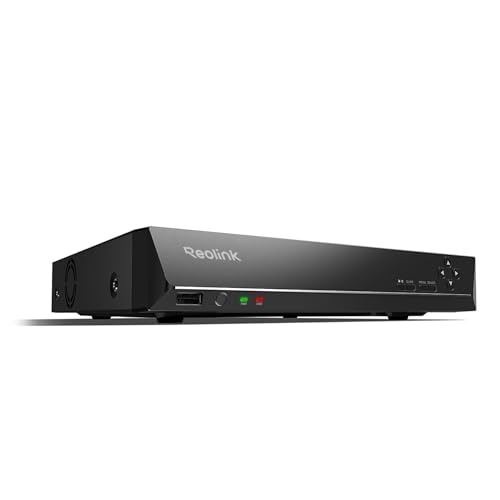
REOLINK RLN8-410 8CH NVR Network Video Recorder PoE
$349.99Eight PoE ports built into the recorder, so the cameras get power and data from the same box and there is no separate switch to budget.
- Channels
- 8
- PoE ports
- 8
Prices change often.
REOLINK RLN16-410 16CH NVR Network Video Recorder PoE
$459.99Sixteen channels for a property that has outgrown eight, and the usual reason to buy one is a detached garage or a second building.
- Channels
- 16
Prices change often.

ANNKE 12MP 8CH PoE Network Video Recorder, No HDD
$159.99Supplied without a drive, which is the cheaper path when you are fitting a surveillance drive sized from your own retention calculation rather than accepting whatever came in the box.
- Channels
- 8
- Resolution
- 12 MP
- PoE ports
- 8
Check first:No hard drive is included. Budget for a surveillance rated drive separately.
Check price on AmazonPrices change often.

TRENDnet 8-Channel UHD PoE NVR, TV-NVR1508
$107.99TRENDnet is a networking company rather than a camera company, and this recorder takes standards compliant cameras rather than locking to one brand.
- Channels
- 8
- PoE ports
- 8
Prices change often.

Lorex V-Series 4K 8-Ch 1TB Network Video Recorder
$399.99Ships with a 1TB drive already fitted, which is enough for four cameras for about two weeks and is a sensible starting point to expand from.
- Channels
- 8
- Drive included
- 1 TB
Prices change often.
Common questions
How many channels does an NVR need for my camera count?
At minimum, one channel per camera, but the common installer convention is to buy the next standard tier above that minimum so there is room to grow. Eight cameras fit an 8-channel NVR exactly with nothing spare, so the convention points to a 16-channel recorder instead, leaving 8 free channels for later.
Does every camera on an NVR need to use the same resolution?
No, an NVR can usually mix resolutions across channels, but the storage and PoE figures in this chart assume every camera is 4MP for simplicity. A mixed system needs its storage and PoE recalculated per camera at its own resolution and class, which the underlying calculators on this site can do individually.
Why does the storage column assume 30 days of retention?
Thirty days is a common conventional target because it covers the usual insurance and police request window, not because any law requires it. Fourteen days is a lighter, more common minimum that still covers a week or two away from home; either is a planning choice you can change on the storage calculator.
What if my cameras are not all IEEE 802.3af Class 3?
Then the PoE budget in this chart will not match your system, since it assumes every camera is a standard Class 3 device. A PTZ camera with a heater, for example, is typically a Class 4, 5 or 6 device with a much higher PSE reservation, and mixing classes requires summing each camera's own class rather than using a single flat number.
Is a 32-channel NVR the largest recorder available?
32 channels is the largest size commonly sold as a standard consumer or prosumer tier, and it is the largest carried in this catalog. Larger channel counts exist in enterprise and commercial recording hardware, but they are a different price and support tier entirely, and are outside the scope of a typical home installation.
Get the system planning sheet
The camera count, storage and PoE budget worksheet, plus the wiring checklist, as one printable page.
Keep going
Before you point a camera at anything. Aim cameras at your own property and your own boundary, never into a neighbour's windows or across their garden. Cameras in bedrooms, bathrooms, or anywhere else a person reasonably expects privacy are a serious legal problem, and that includes guests, lodgers and anyone who works in your home. Audio is legally different from video, many US states require the consent of every party to a recorded conversation, and several recorders capture audio by default, so check your own state before you enable it. Some places require visible notice that recording is taking place, and landlords and homeowner associations often impose their own rules on top. This is researched general information and not legal advice, and the law varies by state and by country.
And once it is installed. Change every default password, keep the firmware updated, and be clear with yourself about where the footage goes: a cloud camera means a third party holds recordings of your home, while a local recorder keeps them in your house. That is a genuine buying consideration, not a technicality.