PoE Switch Budget Chart by Camera Count
Eight IEEE 802.3af Class 3 cameras require a switch to reserve 123.2 W of PSE power (15.4 W each), and with a typical 20 percent installer headroom that becomes a 147.8 W switch budget, sized on what the switch must reserve rather than the roughly 12.95 W each camera actually draws.
A PoE budget has to be sized on the PSE (power sourcing equipment) figure, the amount a switch must reserve per port under the standard, not on the PD (powered device) figure, the amount the camera itself actually draws. The gap between those two numbers is the worst-case cable loss the standard assumes, and building a switch budget from camera draw figures alone will overcommit the switch under real conditions.
| Class | Standard | Switch reserves (PSE) | Camera may draw (PD) | Typical device |
|---|---|---|---|---|
| 0 | 802.3af | 15.4 W | 12.95 W | Unclassified, switch must assume the full 15.4 W |
| 1 | 802.3af | 4 W | 3.84 W | Very low power devices |
| 2 | 802.3af | 7 W | 6.49 W | Small fixed cameras |
| 3 | 802.3af | 15.4 W | 12.95 W | Most fixed PoE cameras, IR bullets and domes |
| 4 | 802.3at | 30 W | 25.5 W | PoE+, heaters, wipers, strong IR, small PTZ |
| 5 | 802.3bt | 45 W | 40 W | PoE++ Type 3 |
| 6 | 802.3bt | 60 W | 51 W | PoE++ Type 3, full-size PTZ with heater |
| 7 | 802.3bt | 75 W | 62 W | PoE++ Type 4 |
| 8 | 802.3bt | 90 W | 71.3 W | PoE++ Type 4, the ceiling of the standard |
| Cameras | Class 3 PSE total | Class 3 recommended switch budget | Class 4 PSE total | Class 4 recommended switch budget |
|---|---|---|---|---|
| 2 | 30.8 W | 37 W | 60 W | 72 W |
| 4 | 61.6 W | 73.9 W | 120 W | 144 W |
| 8 | 123.2 W | 147.8 W | 240 W | 288 W |
| 12 | 184.8 W | 221.8 W | 360 W | 432 W |
| 16 | 246.4 W | 295.7 W | 480 W | 576 W |
| Item | Count | PoE class | PSE watts each | Subtotal |
|---|---|---|---|---|
| Fixed PoE cameras | 8 | Class 3 | 15.4 W | 123.2 W |
| PTZ cameras | 2 | Class 4 | 30 W | 60 W |
| Combined total | 10 ports | mixed | n/a | 183.2 W PSE, 219.8 W recommended switch budget with 20% headroom |
Why budget on the switch reservation, not the camera draw?
The standard defines PSE and PD as different figures on purpose, because a switch has to guarantee enough power over the worst realistic cable run, including resistive loss, without knowing in advance which port will get the longest cable. Sizing a switch to the lower PD figure risks a camera browning out or rebooting under a long or marginal cable run that the standard was specifically built to tolerate.
What is the 20 percent headroom for?
It is a buffer above the raw PSE total to cover a switch's own inefficiency, future camera additions, and the reality that manufacturers rarely advertise a switch's true sustained output exactly at its labeled maximum. A switch bought right at the raw PSE total, with no headroom, leaves no room for even one more camera without an upgrade.
How do you combine cameras of different PoE classes?
Sum each class's PSE figure multiplied by its own camera count separately, then add the subtotals together, exactly as the mixed example above does for 8 Class 3 cameras plus 2 Class 4 cameras. Never average the classes together or assume every camera falls into the same class; a single high-power PTZ or heated camera can add more load than several ordinary fixed cameras combined.
The gear that matches this answer
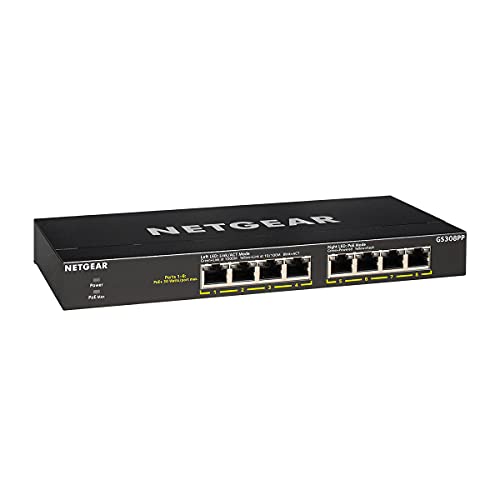
NETGEAR 8-Port PoE Gigabit Ethernet Unmanaged Network Switch GS308PP
$69.99An 83 W budget across eight PoE ports, which carries six to eight class 3 cameras with the headroom that stops a switch shutting a port down on a cold night when the heaters run.
- PoE ports
- 8
- PoE budget
- 83 W
- PoE standard
- 802.3af/at
Prices change often.

TP-Link 8 Port Gigabit PoE Switch, 8 PoE+ Ports at 126W
$89.99A 126 W budget is enough for eight class 3 cameras at their full standards allocation of 15.4 W each, with nothing left to chance.
- PoE ports
- 8
- PoE budget
- 126 W
- PoE standard
- 802.3af/at
Prices change often.

NETGEAR 8 Port PoE Gigabit Ethernet Easy Smart Managed Switch GS308EP
$79.99Managed, so the cameras can be put on their own VLAN and kept off the rest of the home network, which is the single most effective thing you can do about camera firmware you do not control.
- PoE ports
- 8
- PoE standard
- 802.3af/at
Prices change often.

TP-Link TL-SG116P 16 Port Gigabit PoE Switch
$126.38Sixteen PoE ports at a lower price than the equivalent NETGEAR, with a 120 W budget that suits class 2 and class 3 cameras.
- PoE ports
- 16
- PoE budget
- 120 W
- PoE standard
- 802.3af/at
Prices change often.

TP-Link TL-SG1218MP 16 Port Gigabit PoE Switch
$169.99A 192 W budget in a rack mount body, for a system where PTZ cameras and heaters push several ports into class 4.
- PoE ports
- 16
- PoE budget
- 192 W
- PoE standard
- 802.3af/at
Prices change often.
Common questions
Why does PoE budgeting use the switch figure instead of the camera's draw?
Because the switch has no way to know the exact cable length or condition on every port in advance, so the standard requires it to reserve power for the worst realistic case rather than the camera's best-case draw. A Class 3 camera might only pull 12.95 W in practice, but the switch still has to set aside 15.4 W for that port to stay within specification.
What is the difference between 802.3af, 802.3at and 802.3bt?
802.3af is the original PoE standard, topping out at Class 3's 15.4 W per port. 802.3at, PoE+, adds Class 4 up to 30 W. 802.3bt, PoE++, adds Classes 5 through 8, reaching 90 W per port at Class 8. Each generation is backward compatible with lower classes on the same cabling.
How much headroom should a PoE switch budget carry?
A commonly used planning figure is about 20 percent above the raw PSE total, which covers switch inefficiency and leaves a little room for future cameras. A system with no planned growth and a tight budget could run closer to the raw total, but that leaves no slack for adding even one more camera later.
Do PTZ and heated cameras really need a higher PoE class?
Usually yes. A pan-tilt-zoom motor, a heater for cold climates, or strong active infrared illumination all draw meaningfully more power than a simple fixed bullet or dome camera, which is why those devices are commonly Class 4 (802.3at) or higher rather than the Class 3 that covers most ordinary fixed cameras.
What happens if a switch is undersized for its cameras?
Ports can brown out, cameras can reboot unpredictably under load, or the switch can refuse to power some ports at all once its total budget is exhausted, even if each individual port is rated high enough on its own. Sizing the switch on total PSE watts across all cameras, with headroom, avoids discovering this after installation.
Get the system planning sheet
The camera count, storage and PoE budget worksheet, plus the wiring checklist, as one printable page.
Keep going
Before you point a camera at anything. Aim cameras at your own property and your own boundary, never into a neighbour's windows or across their garden. Cameras in bedrooms, bathrooms, or anywhere else a person reasonably expects privacy are a serious legal problem, and that includes guests, lodgers and anyone who works in your home. Audio is legally different from video, many US states require the consent of every party to a recorded conversation, and several recorders capture audio by default, so check your own state before you enable it. Some places require visible notice that recording is taking place, and landlords and homeowner associations often impose their own rules on top. This is researched general information and not legal advice, and the law varies by state and by country.
And once it is installed. Change every default password, keep the firmware updated, and be clear with yourself about where the footage goes: a cloud camera means a third party holds recordings of your home, while a local recorder keeps them in your house. That is a genuine buying consideration, not a technicality.